
mobile-use-setup
🎯Skillfrom minitap-ai/mobile-use
 |
|mobile-use-setup skill from minitap-ai/mobile-use
Installation
npx skills add https://github.com/minitap-ai/mobile-use --skill mobile-use-setupSkill Details
Overview
# mobile-use: automate your phone with natural language

[](https://discord.gg/6nSqmQ9pQs) [](https://github.com/minitap-ai/mobile-use/stargazers) ☁️ Cloud • Discord • [](https://pypi.org/project/minitap-mobile-use/) [](https://www.python.org/downloads/) [](https://github.com/minitap-ai/mobile-use/blob/main/LICENSE)
Mobile-use is a powerful, open-source AI agent that controls your Android or IOS device using natural language. It understands your commands and interacts with the UI to perform tasks, from sending messages to navigating complex apps.
> Mobile-use is quickly evolving. Your suggestions, ideas, and reported bugs will shape this project. Do not hesitate to join in the conversation on [Discord](https://discord.gg/6nSqmQ9pQs) or contribute directly, we will reply to everyone! ❤️
✨ Features
- 🗣️ Natural Language Control: Interact with your phone using your native language.
- 📱 UI-Aware Automation: Intelligently navigates through app interfaces (note: currently has limited effectiveness with games as they don't provide accessibility tree data).
- 📊 Data Scraping: Extract information from any app and structure it into your desired format (e.g., JSON) using a natural language description.
- 🔧 Extensible & Customizable: Easily configure different LLMs to power the agents that power mobile-use.
Benchmarks
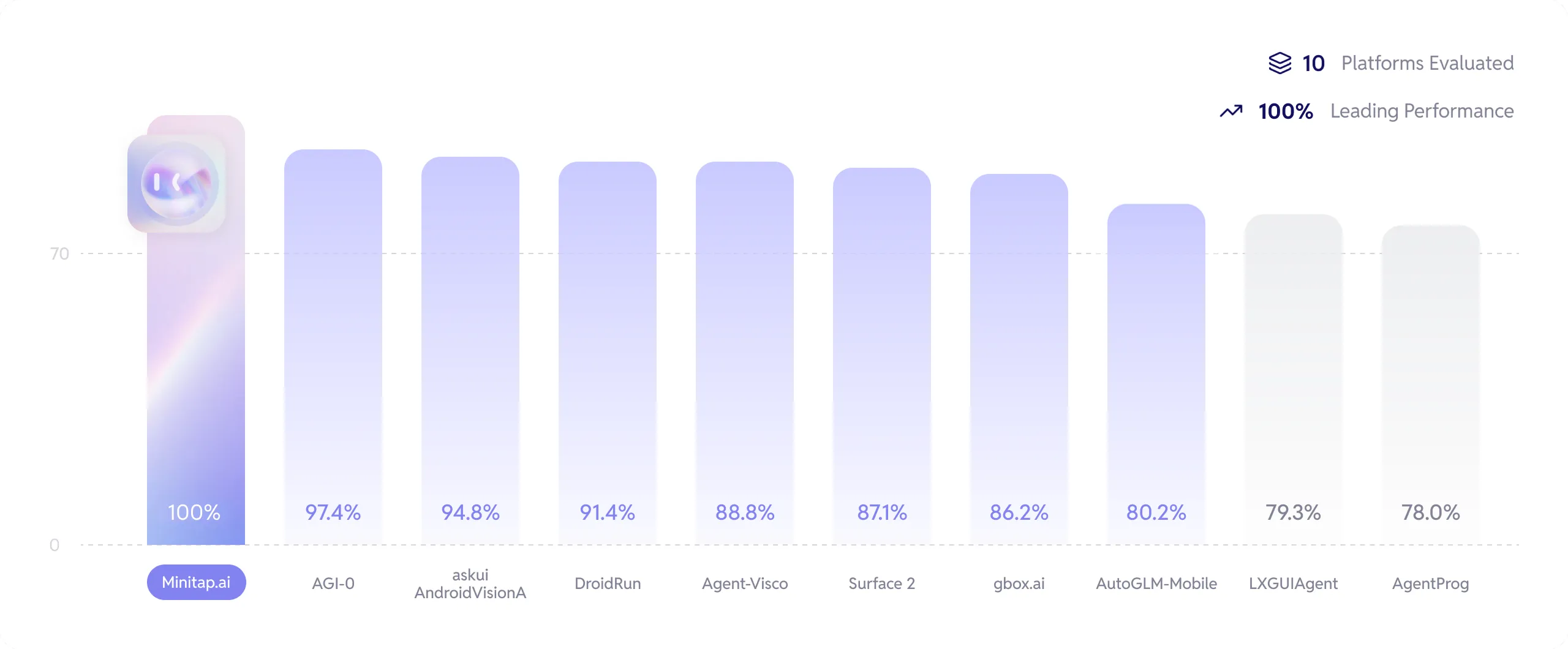
We stand as the top performers and the first to have completed 100% of the AndroidWorld benchmark.
Get more info about how we reached this milestone here: [Minitap Benchmark](https://minitap.ai/benchmark).
The official leaderboard is available [here](https://docs.google.com/spreadsheets/d/1cchzP9dlTZ3WXQTfYNhh3avxoLipqHN75v1Tb86uhHo/edit?pli=1&gid=0#gid=0).
🚀 Getting Started
Ready to automate your mobile experience? Follow these steps to get mobile-use up and running.
🌐 From our Platform
Easiest way to get started is to use our Platform.
Follow our [Platform quickstart](https://docs.minitap.ai/mobile-use-sdk/platform-quickstart) to get started.
🛠️ From source
- Set up Environment Variables:
Copy the example .env.example file to .env and add your API keys.
```bash
cp .env.example .env
```
- (Optional) Customize LLM Configuration:
To use different models or providers, create your own LLM configuration file.
```bash
cp llm-config.override.template.jsonc llm-config.override.jsonc
```
Then, edit llm-config.override.jsonc to fit your needs.
You can also use local LLMs or any other openai-api compatible providers :
1. Set OPENAI_BASE_URL and OPENAI_API_KEY in your .env
2. In your llm-config.override.jsonc, set openai as the provider for the agent nodes you want, and choose a model supported by your provider.
> [!NOTE]
> If you want to use Google Vertex AI, you must either:
>
> - Have credentials