

super-token-saver
🔌Plugin🧩 ModA Claude Code plugin that cuts wasted tokens and lowers your bill. It hands heavy work to helper agents, trims padding from replies, restores past context for free, and warns you when a cache expiry is about to cost extra. A status line and dashboard show your spending.
Installation
git clone https://github.com/ww-w-ai/super-token-saver.gitclaude --plugin-dir ./super-token-saverThis mod is not in a marketplace: clone the repo and load its folder. Run these in your terminal.
Permissions to check
- Writes files
- Runs programs
- Model calls
Also: Interface · Environment · Session info
Raw check output (Claude Code 2.1.322)
hooks: ui.render{component=Spinner}, session.compact
calls: $.clock.now (via awaitPrepared, summarizeNow), $.env.get (via persistSummary, preparedPath, writeReport), $.fs.exists (via readPrepared), $.fs.read (via readPrepared, summarizeNow), $.fs.write (via clearPrepared, persistSummary, writeReport), $.model.complete (via summarizeNow), $.process.run (via awaitPrepared, readTranscript), $.session.cwd (via readTranscript), $.session.id (via preparedPath, readTranscript, writeReport), $.session.model (via summarizeNow), $.session.usage (via readThreshold), $.ui.log
env reads: HOME
README.md
View on GitHub →super-token-saver
The only Claude Code plugin that reads CC's source to find where your tokens go, then plugs the leaks automatically. Spend less. Code longer.
Measured: a real $326/day workload dropped to $180/day, a 45% cut. It keeps sessions bounded and context alive across auto-compact, with automatic SubTask delegation, zero-cost context restoration, a full analytics dashboard, and a guard for cache expiry. One install, zero config.
Works on Max Plan ($200/mo) and API pay-per-use. Same plugin, same features. It matters more on pay-per-use, where there is no monthly buffer and every leaked token lands on the invoice.
What it does in 30 seconds
The plugin automatically reduces token waste and keeps session context bounded. Optional monitoring tools show usage, cost, and rate limits.
| Feature | What happens | Impact |
|---|---|---|
| 🗜️ super-compact | Prepares a continuation summary in the background and keeps recent turns verbatim | Bounded sessions and preserved context without waiting for auto-compact |
| 🧠 Session Architect | Hands heavy work to SubTasks (37.5% cheaper cache) and bundles tool calls to cut round-trips | Smaller context, fewer round-trips, lower bills |
| 🪶 Concise Mode | Trims the padding from responses and keeps the substance | Fewer output tokens per reply |
| 🔄 /s-continue | Replaces /compact. Zero LLM calls, zero cost, zero information loss. Restores Codex sessions too | Free context restoration in both tools |
| 🤝 /s-compact | Writes a handoff that /s-continue loads automatically, including subagent findings and tool results the transcript never keeps | The next session inherits the hidden context |
| 📊 Status Line | Live cost, context size, and rate limit, under 50ms | See trouble before it costs you |
| 📈 /usage-view | Interactive HTML dashboard with AI analysis | Full cost forensics in one click |
| ✂️ /setup-git-lite | Removes the 2,200 hidden tokens CC injects every session | About $48/mo saved on git instructions alone |
| 🛡️ Token Guardian | Warns you the moment a cache expiry re-sends your context, or blocks it in block mode | No more silent $9 surprises |
😤 The Problem
Invisible costs. There's no live view of what you're spending. No "your context is at 800K" warning, no "cache expired 3 minutes ago" alert. You find out after the money is gone.
Compaction interrupts and forgets. When Claude Code reaches its auto-compact limit, it stops to summarize the conversation. You wait, and the lossy summary can leave it missing details. Meanwhile, a growing session costs more on every call.
Context bloat. The same prompt costs 4x more at 800K context than at 200K. Every Read, Grep, and Edit re-sends the whole context. One complex prompt can fire 15+ API calls, and each one is multiplied by your context size.
Cache expiry. You come back from lunch and the cache is gone. Your next prompt re-sends 900K tokens at full price. That's $9 in one shot.
All of it manual. Context management, cache timing, SubTask delegation, session cleanup. Nobody can keep track of all that while actually writing code.
On Max Plan ($200/mo)? Add a 5-hour rate limit that stops your work with no timer and no ETA.
On API pay-per-use? Add the fact that there is no ceiling. One cache miss is $9 of real money. Ten a week is $360/mo on accidents alone. One bad Tuesday with a bloated context can cost more than a Max Plan subscriber pays in a month.
super-token-saver handles all of it for you. Install once. Done.
🚀 Installation
/plugin marketplace add ww-w-ai/marketplace
/plugin install super-token-saver@ww-w-ai
It works as soon as it's installed. Nothing to configure. Requires Claude Code v2.1.71 or later.
For live monitoring:
/setup-statusline install
To remove the 2,200 hidden tokens in CC's built-in git instructions (details):
/setup-git-lite install
🗜️ Feature 1: super-compact — Bounded Sessions, Context Intact
New in v3.8.0. Keep working while your next continuation is prepared.
At 95% of Claude Code's auto-compact threshold, a background fork pre-writes a continuation summary while you work. When compaction fires, the prepared summary, bounded near 10,000 tokens, replaces the engine's lossy summary. Earlier conversation is abbreviated with [L{n}] transcript pointers, so the full original text is one line-read away; the last ~5% stays verbatim.
The session restarts at about 70,000 tokens in steady state instead of ballooning. Recent context survives word for word, and the summary is ready ahead of time, so you don't wait for auto-compact. Bounding the session while retaining context saves tokens and makes long sessions convenient.
The summary carries into the next session through /s-continue. Codex sessions are handled the same way through after-compact restore. It's automatic, needs zero configuration, and falls back to Claude Code's own compaction if anything goes wrong.
🧠 Feature 2: Smart Session Architecture
Install it and the cheaper way of working switches on by itself. Most people do everything in the Main session: file reads, code generation, test runs. Every output piles into the context and gets re-sent with every message. The session gets heavy and the bill grows with it.
Session Architect injects two cost strategies when a session starts.
1. SubTask delegation. Heavy work runs in SubTasks, which have a smaller context and a cheaper cache tier.
| Main Session | SubTask | |
|---|---|---|
| Role | Design, decisions, review | Implementation, code gen, multi-file |
| Cache tier | 1 hour (ephemeral_1h) | 5 min |
| Cache write cost | $10/MTok | $6.25/MTok |
| Context size | ~94K avg | ~33K avg |
2. Fewer round-trips. Total cost is context size times round-trips, and every round-trip re-reads the whole conversation. Five sequential tool calls on a 50K context cost 250K cache-read tokens. Bundle them into two round-trips and it's 100K: 60% saved, same output. The injected rules make Claude bundle independent tool calls, plan the batch first, stop early once it has the answer, and let SubTasks absorb their own round-trips.
Result: context stays under 250K instead of growing past 600K, round-trips drop, and the same work comes out cheaper. Fully automatic.
🪶 Concise Mode
Same substance, less padding. On by default. The SessionStart hook injects response-style rules into every session and model: skip preambles, match length to the job, and keep what moves the next decision. It preserves essential context, verification, and nuance.
🔄 Feature 3: /s-continue — Context Restoration
Replaces /compact. Zero LLM calls. Zero token cost. Zero information loss.
/compact sends your whole context (~1M tokens) to the LLM and compresses it into a summary 3.3% the size. If the cache has already expired, that one call triggers a full re-cache. Losing information is unavoidable.
/s-continue works differently. It preprocesses the previous session's transcript and loads it directly. No LLM call, no cost. The original conversation comes back as it was.
| /compact | /s-continue | |
|---|---|---|
| How it works | Sends full context to LLM for summary | Preprocesses transcript, reads directly |
| LLM calls | Required (typically 100K+ tokens) | 0 |
| Token cost | High | 0 |
| Information loss | Yes (3.3% summary) | None (original preserved) |
| Processing speed | Tens of seconds | < 1 sec (even 60MB+ files) |
| When cache is expired | Full re-cache cost on top | No impact |
| Multi-session restore | Not possible | Supported |
Usage: /clear, then /s-continue. You get a list of previous sessions. Pick one. For the quick path: /s-continue last.
Result: pick up where you left off for free, with nothing lost. A 60MB+ transcript is processed in under a second.
🤝 Its pair: /s-compact — hand off the hidden layer
/s-continue restores the transcript, meaning what you and Claude said. But the most useful knowledge from a working session often lives outside that dialogue: what a subagent found (its transcript is a separate file the restore never loads), a decisive number in a tool output (a test count, a benchmark), a lesson from the process ("couldn't reproduce headless, and it turned out to be the build, not the code").
Run /s-compact at the end of a session and it distills exactly that hidden layer into a handoff, saved to ~/.claude/super-token-saver-data/<project>/handoff.md. Next session, /s-continue loads it automatically on top of the restored transcript. Nothing to paste.
/s-continue alone | /s-compact + /s-continue (the set) | |
|---|---|---|
| Recovers | The transcript (what was said) | The transcript plus the hidden layer |
| Subagent findings | Lost (separate files) | Distilled into the handoff |
| Tool-output numbers | Only if quoted into the chat | Extracted deliberately |
| Process lessons | — | Captured so dead ends aren't re-run |
The workflow: end a session with /s-compact, start the next with /s-continue.
🔀 Start in Claude Code, continue in Codex, come back
Claude Code and Codex can't read each other's history. One writes to ~/.claude/projects/, the other to ~/.codex/sessions/. /s-continue reads both, and the handoff file /s-compact writes is shared per project. So a sprint you started in Claude Code can continue in Codex and return to Claude Code with nothing lost. When one side runs out of budget, the other picks up from the same line. No other plugin restores both tools' history.
It's fast, too. A Codex rollout isn't run through a second parser. It's rewritten into the shape Claude Code already writes, line for line, so one pipeline serves both and every L{n} marker still points at the exact line in the original Codex file. A 12 MB, 1,540-line rollout takes 0.13 s.
Auto-compact keeps the conversation accessible. The prepared continuation summary uses transcript pointers for earlier turns and keeps the recent tail verbatim. Codex compaction and thread rollback are handled through after-compact restore too.
| Claude Code session | Codex session | |
|---|---|---|
Listed by /s-continue | Yes | Yes, scoped to the current project |
| Restored at zero LLM cost | Yes | Yes |
L{n} seek into the original | Yes | Yes — line numbers are the rollout's own |
Context-loss (#0) restore | /compact, auto-compact | Codex compaction and thread rollback |
/s-compact handoff | Shared per project — write it in one tool, load it in the other |
/s-continue codex                    only Codex sessions
/s-continue codex : rust migration   the turns matching a topic, restored in full
Two details separate a correct list from a plausible-looking wrong one. First, Codex's session_id is the thread id, and a spawned subagent inherits it, so sessions are keyed on payload.id and subagent rollouts are filtered out the same way Claude Code's subtask transcripts already are. Second, <codex_internal_context source="goal"> is machine-injected, so it stays in the restored context but is never counted as a turn you typed.
The plugin installs into Codex as well. See README-CODEX.md (한국어 · 日本語 · 简体中文). usage-view reads Codex sessions too and reports their cost as a purchased-credit equivalent. report-limit reports Codex limit windows too; setup-statusline is still Claude Code only.
📊 Feature 4: Live Status Line
Live token and cost monitoring. Under 50ms overhead.
Run /setup-statusline install once and a status bar stays pinned to the bottom of Claude Code.
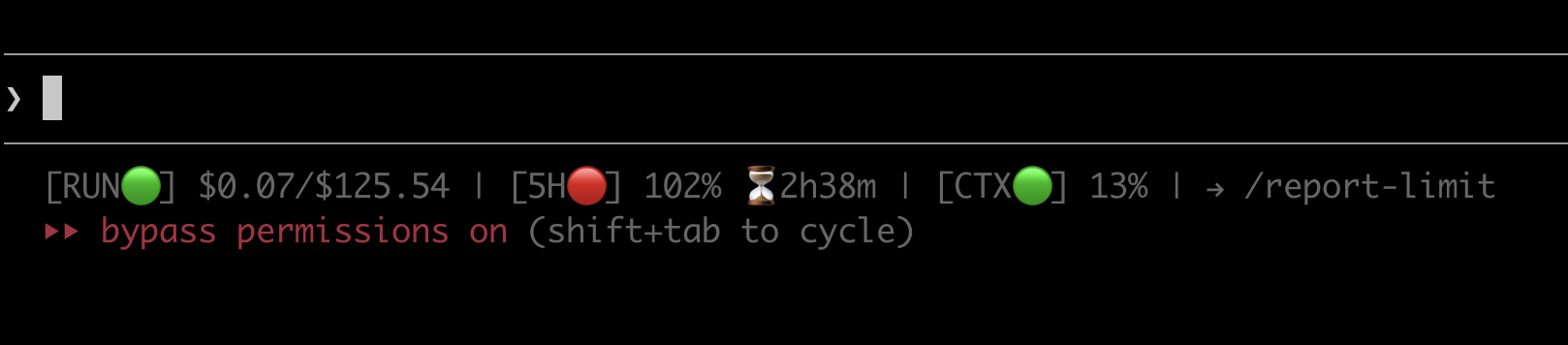
Normal operation. Every metric at a glance, no switching windows.

Rate limit hit. 5H turns red at 102%, the countdown shows exactly when you're back, and a one-tap /report-limit action appears on its own.
| Indicator | What it shows | 🟢 Normal | 🟡 Warning | 🔴 Critical |
|---|---|---|---|---|
| RUN (delta) | Cost of the last API call | < $0.30 | >= $0.30 | >= $1.00 |
| RUN (cumulative) | Cumulative cost for this folder | — | — | — |
| 5H | 5-hour window usage + reset countdown | < 70% | >= 70% | >= 90% |
| CTX | Context window usage | < 35% | >= 35% | >= 70% |
When any indicator reaches warning or critical, a → /usage-view current hint appears automatically.
To remove it: /setup-statusline uninstall. Your previous config comes back on its own.
Result: every cost problem is visible as it happens. Under 50ms overhead, so you won't feel it.
On pay-per-use? The 5H and W indicators hide themselves, since you have no rate-limit windows. What's left is what matters: RUN (live cost per turn) and CTX (context size). The two levers that decide your bill, always in view.
📈 Usage Dashboard (/usage-view)
Finally, an answer to "where did all that money go?" Max Plan users hit the rate limit and wonder why. API users open the Anthropic invoice and wonder how. Either way the questions are the same. Which session burned the most tokens? When did costs spike? What does my usage pattern look like? Until now, none of it was visible.
/usage-view shows all of it. An interactive HTML dashboard opens in your browser, so you can study your usage patterns and trace a cost spike back to its cause. No external dependencies. Runs on its own. Shareable as a single file.
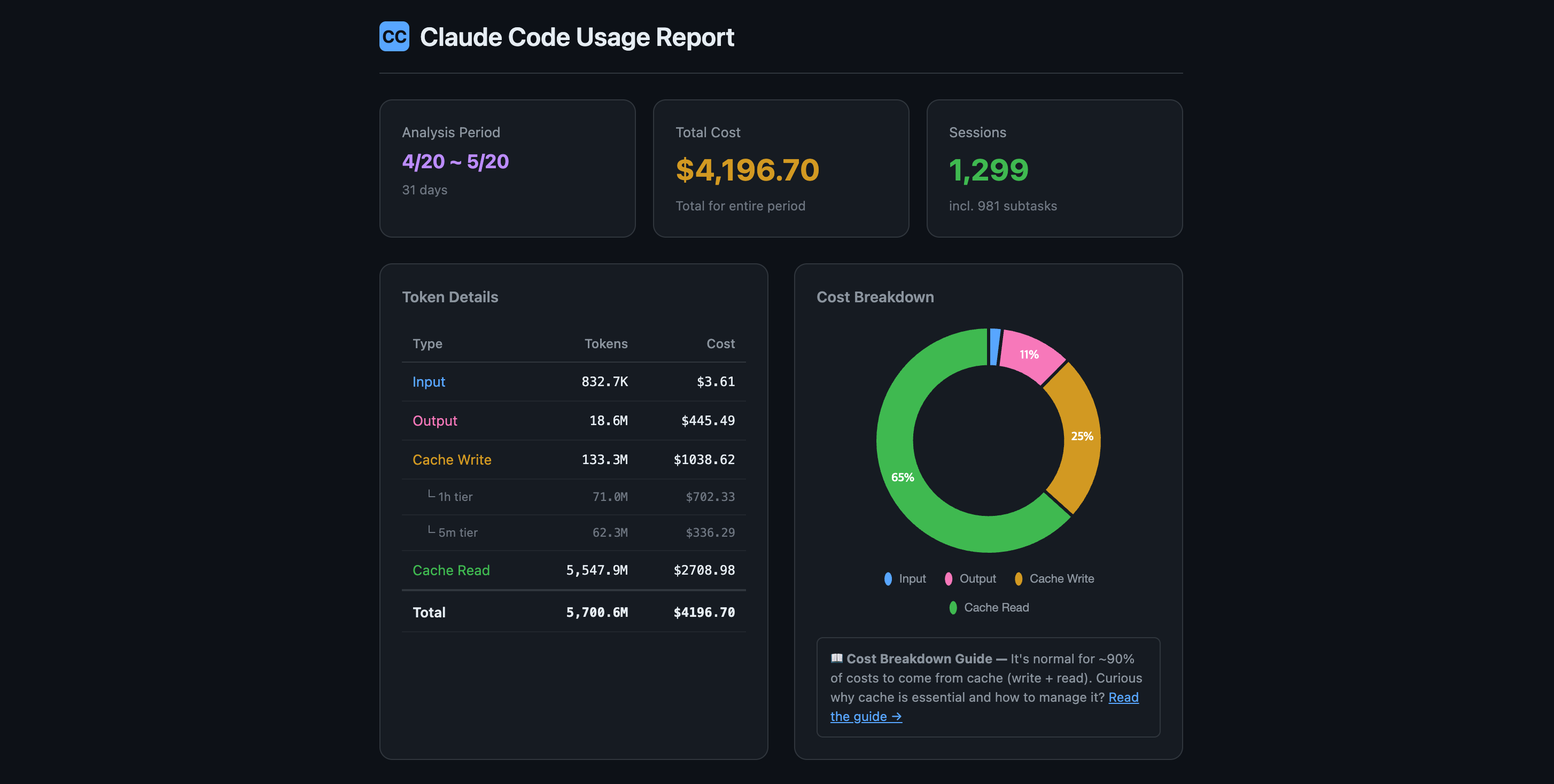
Overview: total cost, token types, cache efficiency, and sessions.
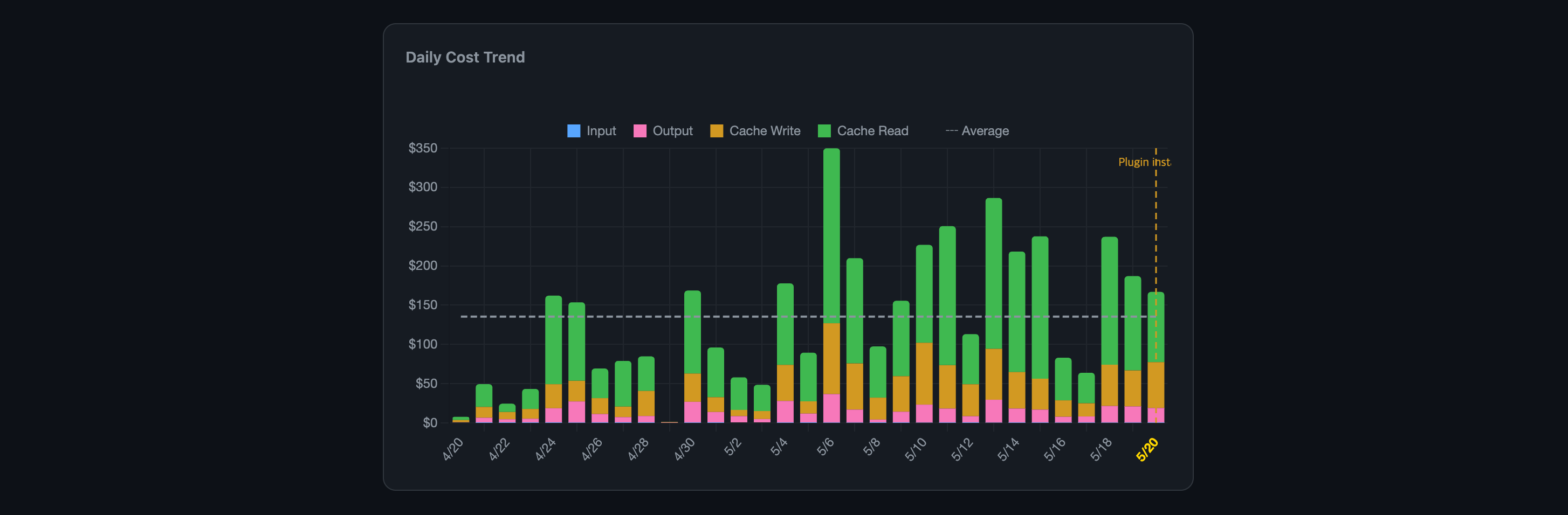
Daily cost trend: compare token costs before and after installation.
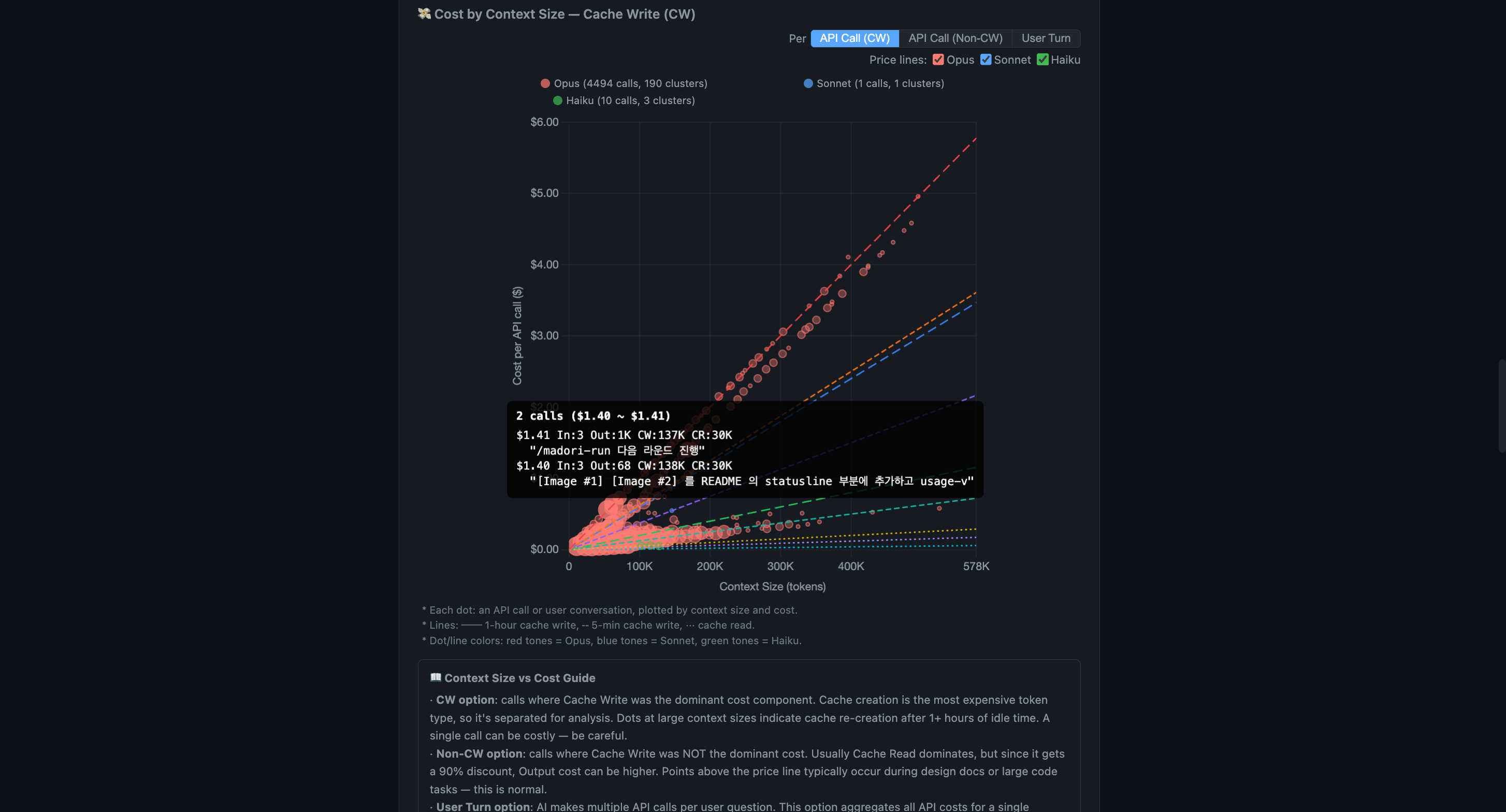
Cost by context: inspect each API call or user turn, its prompt, tokens, and cost breakdown.
Calendar heatmap: explore usage windows, rate limits, and session details.
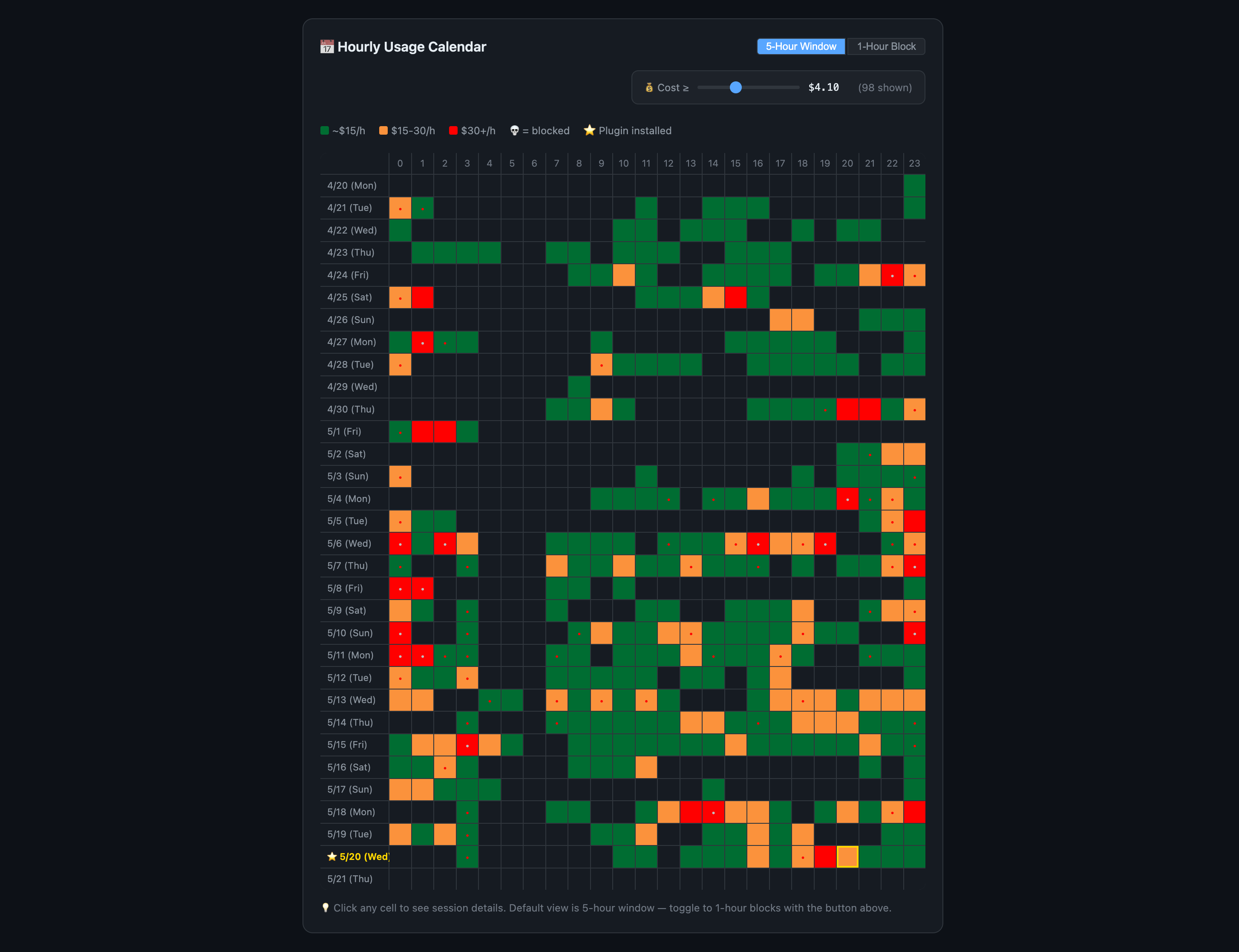
- Explore hourly and weekday patterns, efficiency trends, context-size distribution, and session drilldowns.
- Run optional AI analysis in 23 languages.
- Share the self-contained, offline HTML file;
privatemode strips prompt text.
Accounts have separate tabs, and copied requests in resumed or forked sessions are counted once. It reads ~/.claude, $CLAUDE_CONFIG_DIR, and folders listed in SUPER_TOKEN_SAVER_CONFIG_DIRS (separated by :, or ; on Windows).
/usage-view                  # All time, all projects
/usage-view current          # Current 5-hour window only
/usage-view last 7 days      # Last 7 days
/usage-view locale ja        # Japanese
/usage-view --no-ai          # Skip AI analysis (faster)
/usage-view private          # Strip prompt text (safe to share)
🔬 Rate Limit Research (/report-limit)
A community project to reverse-engineer the unpublished 5-hour rate-limit formula.
Run /report-limit — no rate limit needed. It sends every 5-hour window of your last 7 days as a pre-filled GitHub Discussion; review it and submit. /report-limit blocked sends only the windows where you hit the limit. The more data we collect, the clearer the formula gets. With two or more logins on record, one report covers every account, split by account — each with its own 5-hour windows — and names them Account 1 (the current login), Account 2, and so on.
✂️ Feature 5: /setup-git-lite — Trim CC's Built-in Git Instructions
We read Claude Code's source. We found 2,200 tokens slipped into every session that you were paying for without knowing.
On 2026-04-12, a GitHub issue showed that Claude Code's built-in includeGitInstructions setting burns tokens every session. We reproduced it independently with this gist by spilist and confirmed the numbers: +6,031 tokens of cache writes per session after each git commit, and +1,690 tokens of cache reads on every API call.
Claude Code v2.1.88 injects about 500 tokens of git status into the system prompt and 1,700 tokens of commit and PR instructions into the Bash tool description. Depending on the cache path, changing git status can invalidate a roughly 6K-token cache block or be sent as fresh input on every call; the workflow instructions are read from cache on each call, roughly $0.08 per 100-call session at Opus 4.7 pricing.
/setup-git-lite disables the native instructions and injects a curated 280-token replacement at session start. It retains critical safety overrides and a compact git state, while omitting detailed workflows and PR templates.
Expected savings (Opus 4.7 pricing, $25/MTok output, $5/MTok input, $0.50/MTok cache read)
| Item | Original | With setup-git-lite | Saved |
|---|---|---|---|
| System prompt load (per new session) | ~2,200 tok cache_create | ~280 tok cache_create | ~1,920 tok |
| Repeat calls in same session | ~1,700 tok cache_read/call | ~280 tok cache_read/call | ~1,420 tok/call |
| 100-call session (Opus 4.7) | — | — | ~$0.11 saved |
| 20 sessions/day × 22 workdays | — | — | ~$48 saved/month |
Usage
/setup-git-lite status     # Read-only diagnostic — current state + what would change
/setup-git-lite install    # Disable CC native + enable our minimal hook
/setup-git-lite revert     # Restore default (aggressive; see below)
/setup-git-lite dismiss-banner    # Silence the occasional recommendation tip
/setup-git-lite undismiss-banner  # Re-enable the tip
/setup-git-lite help       # Full usage
Install semantics
install changes two places, to be safe.
~/.claude/settings.jsongets"includeGitInstructions": false- Your shell profile (
~/.zshrc,~/.bashrc, etc.) gets a marker block exportingCLAUDE_CODE_DISABLE_GIT_INSTRUCTIONS=1
Either one alone disables CC native. We set both so an environment override can't quietly turn the native behavior back on. The shell change applies to new shells only.
Revert semantics — aggressive
revert removes every CLAUDE_CODE_DISABLE_GIT_INSTRUCTIONS export from your shell profile, including any you added by hand before installing this skill. That's deliberate: you ran revert, so you get the clean default back. A timestamped backup of the shell profile is always made first.
If you need that variable for something else, note it down before running revert and add it back afterwards.
Before uninstalling super-token-saver
Run /setup-git-lite revert first. Otherwise you're left with includeGitInstructions: false in settings.json and no replacement hook, so Claude gets no git guidance at all. Claude Code has no plugin-uninstall hook yet, so we can't do this for you.
Claude runs git status or git log when needed instead of receiving a precomputed snapshot. The detailed commit procedure and PR body template are no longer injected; add your preferred template to CLAUDE.md if needed.
While CC's native git instructions are still active on your machine, super-token-saver shows a one-paragraph tip at session start about 20% of the time (and in /usage-view and /report-limit output). Dismiss it for good with /setup-git-lite dismiss-banner.
🛡️ Feature 6: Token Guardian
Tells you the moment a cache expiry costs you. Can block the $9 re-send if you ask it to.
Claude Code's prompt cache lives for 1 hour. Step away longer than that and it expires. Your next message re-sends the entire context at full price. At 900K tokens, that's $9 in one shot.
Token Guardian remembers when the last reply arrived. If more than 3,590 seconds have passed (the TTL minus a 10-second buffer), it can step in. It is off by default, because of Remote Control. A hook's block message is rendered locally as a system message the remote client never receives, so a remote user saw the prompt vanish with no explanation. Rather than ship a guard that behaves differently depending on where you sit, we turned it off. When Remote Control starts forwarding hook messages, the default comes back on. Until then, turn it on yourself with one of two modes.
export CC_TOKEN_SAVER_CACHE_GUARD=warn    # Claude mentions the expiry in its first line
export CC_TOKEN_SAVER_CACHE_GUARD=block   # the prompt is refused once with the message below
In warn the prompt goes through, and Claude opens its reply with one line saying the cache had expired, this turn paid for the whole context, and after a break of an hour or more /clear → /s-continue is the cheaper way back. This one does reach a remote client, because Claude's reply is forwarded even though hook messages are not.
In block the prompt is refused once with the message below. Send it again and it goes through. Use it in a local terminal when you want the hard stop.
🚨 Cache expired (68m 23s idle)

The prompt cache has expired. Continuing will resend the full context.
Cost may increase significantly.

👉 /context — Check current context usage before deciding
👉 /clear → /s-continue — Reset, then restore previous context (recommended, cheapest)
👉 Re-send — Continue as-is (full re-cache cost incurred)
The block message is shown in 23 languages, picked from your OS locale, and fires once per idle period.
Background agents are never blocked. Only prompts a human typed get the check. Completion reports from background agents and tasks, which these days often arrive more than an hour after launch, pass straight through. A long-running agent's result is never held up or lost.
Result: in warn mode you always know when a $9 re-send happened, and why. In block mode it doesn't happen: every expiry caught saves $9, and at one a day that's $270/mo of pure waste gone.
On pay-per-use this hits harder. A Max Plan subscriber loses $9 inside a $200 buffer. You lose $9 of real money, quietly, every time you step away. Block mode stops it every time.
💡 How Cache Actually Works (And Why Most Users Waste 40%+ on It)
Claude Code sends the entire conversation history to the model on every API call. And "API call" doesn't mean "one message you typed." A single prompt triggers internal tool calls (Grep, Read, Edit, Write), and each of those is its own API call. One prompt easily turns into 10+ API calls.
Prompt caching cuts that cost by 90%. But the cache has a lifespan.
| Main Session | SubTask | |
|---|---|---|
| Cache TTL | 1 hour (ephemeral_1h) | 5 min |
| Cache write | $10/MTok | $6.25/MTok |
| Cache read | $0.50/MTok | $0.50/MTok |
| When cache expires | Full context re-sent at full price | Low impact (context is small) |
Even with the cache alive, costs add up. Here's an extreme scenario to show the difference.
Scenario: Full-day coding (3h morning → 2h lunch/meeting → 3h afternoon)
Conditions: Opus 4 pricing, 1 prompt per minute, ~5 API calls per prompt (~300 calls/hour).
| Phase | Without super-token-saver | With super-token-saver |
|---|---|---|
| Morning 3h | Main context 100K → 600K (avg 350K); 900 calls = $157.50 | Main context 100K → 300K (avg 200K); 900 calls = $90 |
| 2h break and return | Expired cache: $9; /compact: ~$1.50 | Token Guardian in block mode; /clear + /s-continue: $0 |
| Afternoon 3h | Context regrows; 900 calls = $157.50 | Main context averages 200K; 900 calls = $90 |
| Total | ~$326 | ~$180 |
SubTasks keep the Main context smaller, and restoration avoids the re-cache after the break. $326 → $180: $146 saved per day, a 45% cost cut. For API pay-per-use, $146/day × 22 workdays is $3,200/mo off the invoice; for Max Plan, fewer tokens can mean more room before the rate limit.
🔧 Source Install & Customization
git clone https://github.com/ww-w-ai/super-token-saver.git
/plugin marketplace add /path/to/super-token-saver
/plugin install super-token-saver@ww-w-ai
super-token-saver is open source (Apache-2.0). Plain JavaScript and Bash: no compiled binaries, no external API calls, no telemetry. Every line can be read. Every claim in this README points to a file you can open.
- hooks/ — cache expiry threshold, warning messages, session architecture rules
- scripts/ — analysis logic, report builder, status line formatting
- skills/ — how /s-continue and /usage-view work, prompt templates
- locales/ — add or edit translations, add new languages
- skills/usage-view/ — dashboard UI/UX
Make it yours. Fork it, experiment, and send a PR if you find something better.
🌐 Supported Languages
23 languages. We picked them by crossing the top 20 countries by Claude Code usage with the top 20 languages by speaker count. The display language is detected from your OS locale. You can also set it by hand: /usage-view locale ja
| 🇺🇸 English | 🇰🇷 Korean | 🇯🇵 Japanese | 🇨🇳 Chinese |
| 🇪🇸 Spanish | 🇫🇷 French | 🇩🇪 German | 🇧🇷 Portuguese |
| 🇮🇹 Italian | 🇷🇺 Russian | 🇸🇦 Arabic | 🇮🇳 Hindi |
| 🇧🇩 Bengali | 🇮🇩 Indonesian | 🇲🇾 Malay | 🇹🇭 Thai |
| 🇻🇳 Vietnamese | 🇹🇷 Turkish | 🇵🇱 Polish | 🇳🇱 Dutch |
| 🇮🇱 Hebrew | 🇸🇪 Swedish | 🇳🇴 Norwegian |
The current translations are AI-generated. Native speakers are welcome to improve them: edit the JSON file for your language in locales/ and send a PR.
⚖️ What This Plugin Costs You
The plugin injects context at session start. Here's exactly how much.
| Injection | When | Tokens | Purpose |
|---|---|---|---|
| Session Architect | SessionStart (once) | ~1,100 | SubTask delegation + round-trip minimization + concise mode rules |
| Git context (if git-lite enabled) | SessionStart (once) | ~280 | Replaces CC's native ~2,200 tok git instructions |
| Cache expiry warning | On idle > 59m (once) | ~200 | Flags the expensive re-send, shows the cheaper path |
| Status line | Every API call | 0 | Renders to terminal status bar, not conversation context |
Net overhead per session: ~1,400 tokens (one-time, cached after the first call).
At Opus pricing ($0.50/MTok cache read), that's $0.0007 per API call, less than a tenth of a cent. Over a 100-call session: $0.07.
With git-lite enabled, the plugin actually saves ~1,920 tokens per session (2,200 replaced by 280). The net effect is negative: it removes more than it adds.
For pay-per-use users: at $3,000/mo of spend, the plugin's overhead is under $2/mo. One blocked $9 re-send pays for a year of it.
💡 Tips
- Keep
CLAUDE.mdlean and use/btwfor side questions. - Delegate heavy work to SubTasks; watch CTX and the 5-hour window on the status line.
- After an hour away, use
/clear→/s-continueto restore context without an LLM call. Token Guardian can warn or block after cache expiry. - Review
/usage-viewregularly, especially on API pay-per-use, where costs can climb without a rate limit.
📚 Documentation
- Prompt Cache Guide — Why most of your cost is cache, how caching works across providers (Anthropic, OpenAI, Gemini), and how to manage it (한국어 · 日本語 · 中文 · Español · Français · Deutsch · +16 languages)
- Fable 5.1 vs Opus 5 Cost Analysis — At least 24–38% cheaper than Opus 5 at equal quality, measured across 2,782 sessions
- Fable 5.1 vs Opus 5 Cost Analysis (한국어)
- Claude's Weekly Limit Moved as Announced — Five months of Claude Code statusline data checked against every official announcement: since May the weekly limit dropped once, on 9/14, by exactly the announced 17%. Why it still feels smaller, plus every 2026 reset.
- Claude's Weekly Limit Moved as Announced (한국어)
- Opus 4.7 vs 4.6 Cost Analysis — Side-by-side cost comparison across 8,563 API calls
- Opus 4.7 vs 4.6 Cost Analysis (한국어)
License
Apache-2.0